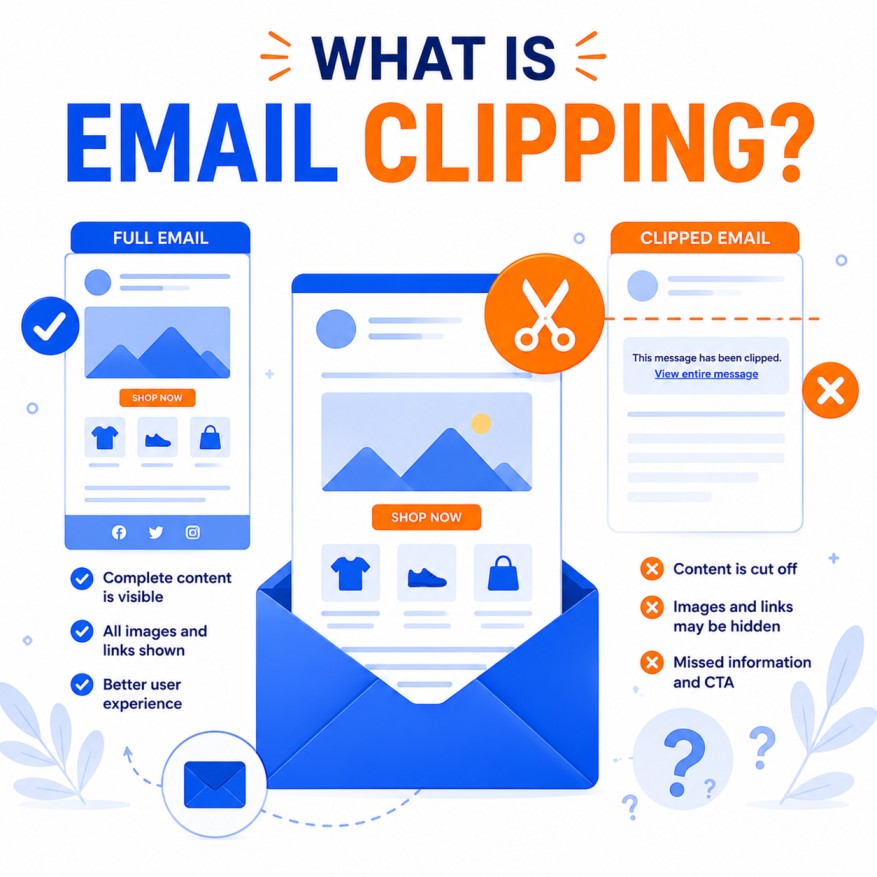
Email clipping is one of the most frustrating yet common technical challenges in email marketing. It occurs when an email client automatically truncates (or “clips”) the content of your message because it exceeds a certain size limit. The recipient sees only the beginning of the email, followed by a notice such as [Message clipped] View entire message, forcing them to click a link to view the full content in a web browser.
This guide provides an exhaustive, highly detailed exploration of email clipping — its causes, technical mechanics, impact on marketing performance, how different email clients handle it, prevention strategies, best practices, tools, testing methods, and advanced optimization techniques for 2026.
1. What Exactly Is Email Clipping?
Email clipping is a protective and performance-related mechanism used by email clients to prevent overly large messages from slowing down the inbox experience or consuming excessive resources on the user’s device.
- Primary Culprit: Gmail (the most common source of clipping complaints).
- How It Appears: After a certain point in the email, content stops rendering. A gray bar or link appears saying “Message clipped” or “View entire message.”
- Technical Trigger: The limit is based on the HTML code size (not the rendered visual size or image file sizes). Gmail’s general threshold is approximately 102 KB.
- Consequence: Everything below the clipping point is hidden until the user clicks the link, which opens the full email in a web view.
Clipping is not the same as spam filtering or rejection — the email is still delivered, but the user experience is severely degraded.
2. Why Email Clipping Happens: Technical Deep Dive
Main Causes:
- Large HTML File Size: Inline CSS, complex table structures, excessive comments, redundant code, or heavy use of custom fonts and styles.
- Long Content: Very lengthy text, multiple sections, or extensive product catalogs in one email.
- Embedded Elements: Base64-encoded images (heavily discouraged), excessive inline styles, or complex conditional code (e.g., for mobile/desktop).
- Tracking Pixels and Footers: If placed at the bottom, they can be cut off, breaking open-rate tracking.
- Device Variations: Limits can differ slightly between desktop and mobile Gmail apps.
Other Email Clients:
- Outlook: Has its own limits (often higher, around 300–500 KB in some versions), but can clip based on rendering issues.
- Apple Mail: Generally more forgiving but can clip very large messages.
- Yahoo and Others: Less strict but still apply size-based restrictions.
Gmail is by far the most aggressive and most widely used, making it the primary concern for marketers.
3. The Serious Impact of Email Clipping on Marketing Performance
Clipping is more damaging than it first appears:
- Broken User Experience: Important CTAs, offers, product details, or final calls-to-action can be hidden.
- Tracking Pixel Loss: Open-rate tracking becomes inaccurate if the 1×1 pixel at the bottom is clipped.
- Lower Engagement: Many users never click “View entire message,” leading to lost clicks and conversions.
- Deliverability Signals: Repeated clipping can indirectly affect sender reputation if users mark emails as spam due to frustration.
- Brand Perception: Professional, well-designed emails suddenly appear broken or incomplete.
- Mobile Impact: Since most emails are opened on mobile, clipping exacerbates the problem on smaller screens.
In 2026, with rising privacy restrictions and focus on accurate measurement, clipping directly undermines your ability to track and optimize campaigns.
4. How to Check If Your Emails Are Being Clipped
- Send test emails to Gmail accounts (personal and business).
- Use testing tools like Litmus, Email on Acid, or GlockApps.
- Check the rendered size in the email builder’s preview or export HTML and check file size.
- Monitor campaign reports for unusually low open rates or sudden drops in engagement.
5. Proven Strategies to Prevent and Minimize Email Clipping
Core Rule: Keep your final HTML email size under 85–100 KB for safety (well below Gmail’s 102 KB threshold).
Detailed Optimization Techniques:
Code and HTML Optimization:
- Minify HTML and CSS (remove whitespace, comments, unnecessary line breaks).
- Use a code minifier tool (HTML Crush, online minifiers).
- Simplify table structures — avoid excessive nesting.
- Remove redundant or deprecated code.
- Move heavy styling to inline where necessary but optimize carefully.
Content and Design Best Practices:
- Keep emails concise and focused — one primary goal per email.
- Use fewer images or optimize them heavily (compress, use WebP where supported).
- Avoid embedding large base64 images — host externally and link.
- Place critical content (main offer, CTA, tracking pixel) near the top.
- Move unsubscribe link and legal footer higher if possible.
- Limit the number of sections and blocks.
Advanced Code Techniques:
- Use efficient CSS (avoid heavy frameworks).
- Implement responsive design with media queries carefully.
- Test conditional code (Outlook-specific) and keep it minimal.
- Use tools like MJML or Stripo that generate cleaner, lighter code.
Workflow Best Practices:
- Always test the final exported HTML size.
- Send test emails with unique subject lines to avoid Gmail’s duplicate detection.
- Split very long campaigns into a series of shorter emails.
- Use “View in Browser” links as a safety net.
6. Tools and Resources for Managing Email Clipping
- Email Builders: Stripo, Bee, Klaviyo, ActiveCampaign (with size warnings).
- Testing Platforms: Litmus, Email on Acid.
- Code Minifiers: HTML Crush, CleanHTML.
- Size Checkers: Various online HTML size analyzers.
- Analytics: Monitor Gmail-specific performance in your ESP reports.
7. Case Studies and Real-World Impact
Many brands have reported 10–30% engagement lifts after fixing clipping issues. Common patterns include:
- Moving tracking pixels higher in the code.
- Simplifying designs and reducing code bloat.
- Splitting long newsletters into shorter, focused campaigns.
8. Future Outlook for Email Clipping in 2026+
- Email clients may adjust limits as hardware improves.
- Greater adoption of lighter, modern email coding standards (MJML, Tailwind for email).
- AI-assisted email optimization tools that automatically minimize size.
- Continued emphasis on mobile-first, concise content.
Conclusion: Treat Email Size as a Core Deliverability and UX Priority
Email clipping is a technical reality that every serious email marketer must address proactively. By keeping your HTML code lightweight, designing with purpose, testing rigorously, and placing critical elements strategically, you can ensure your carefully crafted messages reach subscribers in full — driving better engagement, accurate tracking, and stronger results.
Start today by auditing your last few campaigns for clipping issues, optimizing your email templates for size, and implementing the best practices outlined in this guide. In 2026’s competitive inbox environment, every kilobyte counts — and avoiding clipping is one of the highest-ROI improvements you can make to your email program.